Starting from the project
The finance view and project overview provide access to invoice drafts. The client and project links give billing its context.

E-invoicing
OOKI's one-click billing transfers project services into an editable invoice draft. You review the items and then select the output, such as ZUGFeRD. Drafting, review and export are separate steps.
Try the demo (DE)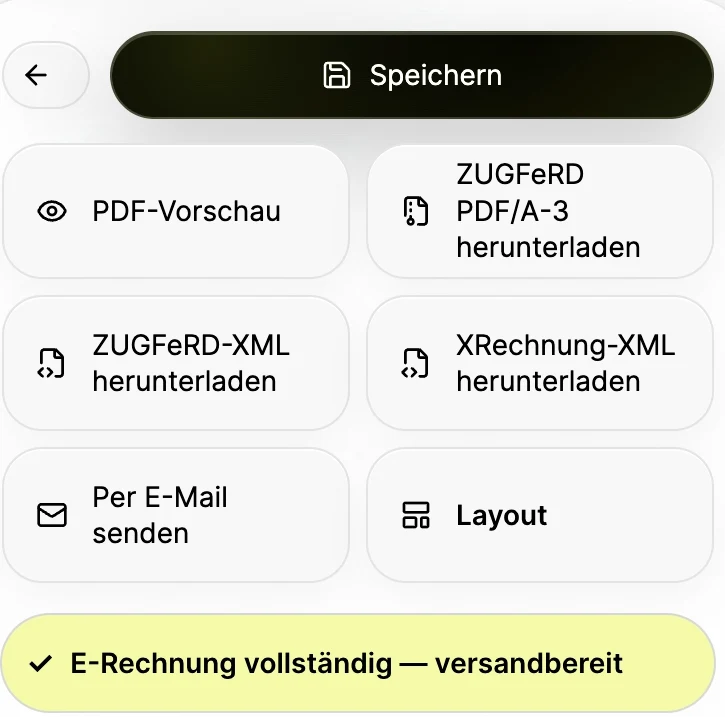
The finance view and project overview provide access to invoice drafts. The client and project links give billing its context.
Edit quantities, units, prices, taxes and payment terms directly in the invoice draft. The recorded services remain the starting point.
Choose between the invoice editor's ZUGFeRD/PDF/A-3 and XML outputs. The right format depends on the recipient and their requirements.
Billing
Generate the invoice draft and check the transferred items.
Billing
Check client details, service period, amounts and payment terms. Changes remain within the invoice document.
Billing
Choose the appropriate export and check the generated file against the recipient's requirements.
Before exporting, clarify whether your client needs ZUGFeRD or XRechnung. Check client details, service period and amounts in the draft, then inspect the generated file. Creating an invoice does not replace a professional review by your accounting team.
Project information and recorded services form the basis of an invoice draft. Review line items, the recipient and terms, then choose the appropriate export format. Billing stays linked to the assignment without skipping review or delivery.
It means starting an invoice draft from selected project services. Review, any missing information, approval and sending remain separate steps. Creating a draft quickly does not by itself ensure that the invoice is correct.
Invoice settings include a prefix, the next invoice number, a default hourly rate, VAT rates and payment terms. Line items have units such as hour, day, item or flat fee. Check the defaults before your first invoice and review each document.
The invoice editor shows export options for PDF, ZUGFeRD PDF/A-3, ZUGFeRD XML and XRechnung XML. First clarify the format and delivery channel required by the recipient. Format selection, content review and actual delivery are separate decisions.
The invoice draft is a separate document. You can edit its items without changing the original time entry or task description. You can try this in the sample demo.
The visible PDF preview and the available structured export options are different outputs. Choosing the right export requires checking the recipient's requirements and the actual file contents.
Transfer approved services in the demo and edit the invoice items. No invoice is sent.
Try the demo (DE)